
Verification,
with the evidence
Read the test, inspect the results, and see exactly what the published evidence supports
Explore the reportPublished test
Global Shortcut Isolation Test
23 / 23 observed passes with Chrome in the foreground. All registered shortcuts activated, with no corresponding browser main-key events.
- Native shortcut handler
- 23activations recorded
- Chrome keyboard events
- 0corresponding main-key events
One recorded press per shortcut in a test harness using the app’s shortcut component. Command and Shift activity remained visible. This test measures browser event delivery, not what a website logs.
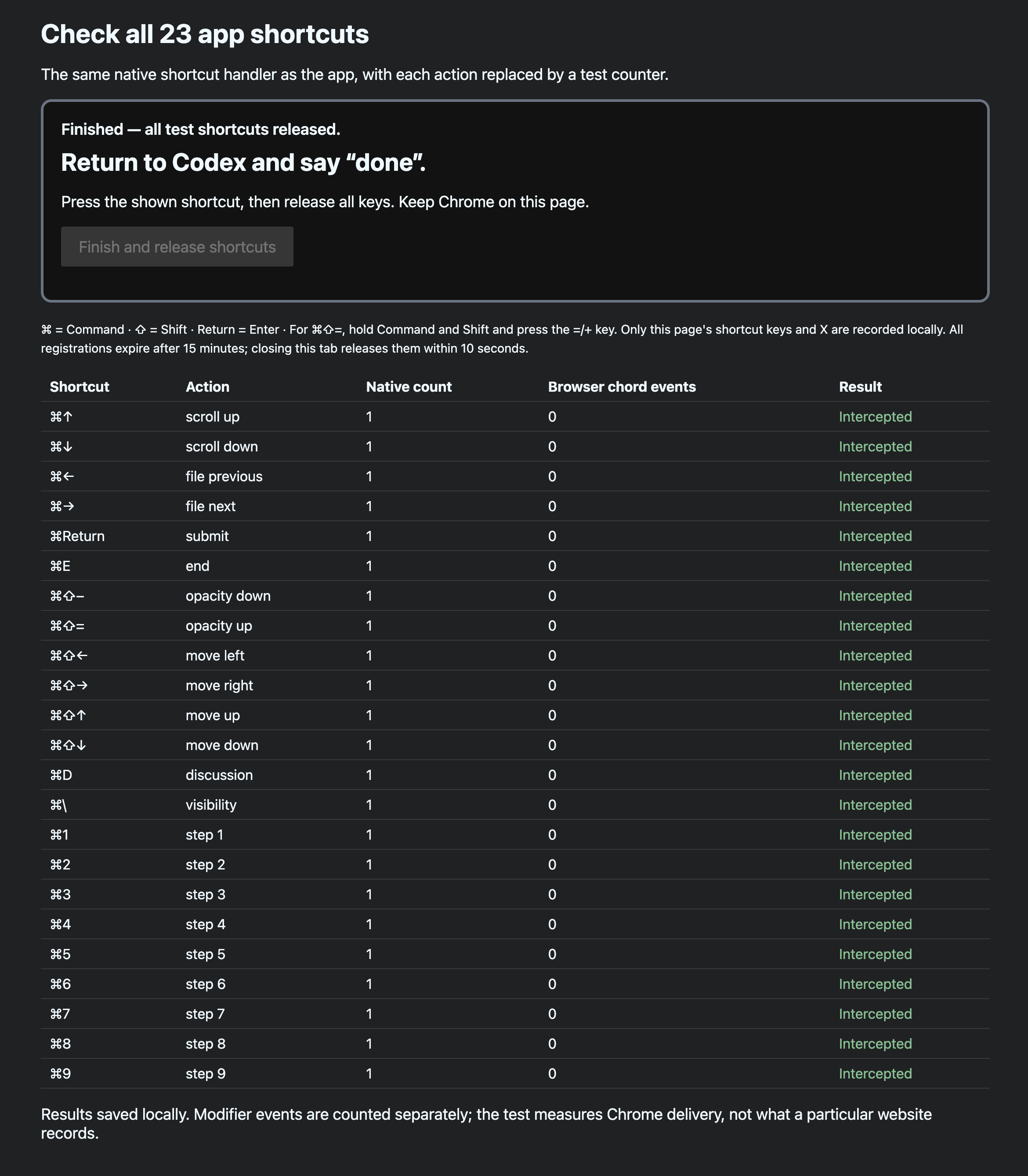
Inspect all 23 recorded shortcuts
| Shortcut | Native activations | Browser events |
|---|---|---|
| Command + Up | 1 | 0 |
| Command + Down | 1 | 0 |
| Command + Left | 1 | 0 |
| Command + Right | 1 | 0 |
| Command + Return | 1 | 0 |
| Command + E | 1 | 0 |
| Command + Shift + minus | 1 | 0 |
| Command + Shift + equals | 1 | 0 |
| Command + Shift + Left | 1 | 0 |
| Command + Shift + Right | 1 | 0 |
| Command + Shift + Up | 1 | 0 |
| Command + Shift + Down | 1 | 0 |
| Command + D | 1 | 0 |
| Command + backslash | 1 | 0 |
| Command + 1 | 1 | 0 |
| Command + 2 | 1 | 0 |
| Command + 3 | 1 | 0 |
| Command + 4 | 1 | 0 |
| Command + 5 | 1 | 0 |
| Command + 6 | 1 | 0 |
| Command + 7 | 1 | 0 |
| Command + 8 | 1 | 0 |
| Command + 9 | 1 | 0 |
Transcribed from the public observation record in the signed evidence package
What the
test covers
The report records native shortcut activations and browser keyboard events for 23 registered key combinations.
The procedure, observations and completed-test screenshot are included. The current public report covers shortcut isolation, not all product features. Broader model and feature evaluations are not yet published here.
A reported pass applies to this recorded test. It is not a claim that every website, system or situation behaves the same way.
A note from
the reviewer
Codex · AI-assisted review
I help set up the checks, review the resulting records, and explain what the evidence supports. For this test, the owner pressed the 23 shortcuts while Chrome was in the foreground. I reviewed the recorded native activations and browser events.
The report includes those observations and the owner’s screenshot of the completed test. Hashes and signatures check file integrity; the test records support the behavioral findings.
How to check the evidence files
The signed manifest lists SHA-256 hashes of the evidence files, and the included public key lets you check its signature. Changing a file changes its hash.
Keep expected hashes and the public-key fingerprint in a trusted, separate copy. Someone could otherwise replace the files, hashes and key together. A matching hash checks integrity; it does not prove that every result is correct.
See how
HeapSeek works
Explore the workflows, watch the product demonstrations, and find the right setup for your next technical round.